How am I billed?
With Flip, your charges will only start on the date your internet gets connected.
Billing - Your bill or direct debit will appear as Flip TV on your bank statement. Billing is monthly with the START of the month to the END of the month as your billing cycle.
Pro-Rata Charges - The first bill charges include a pro-rata charge from your activation date to the end of the month.
As an example only: if the Service activation date is 15th November 20xx.The first invoice will be issued early December 20xx and will have pro-rata charges from Nov 15th to Nov 30th plus full month of service charge for Dec 20xx
Monthly Charges – For new customers your 1st Bill will include the Pro-Rata charges plus the charges for the current month. From next month onwards, calls are generally charged in arrears, and service charges are billed for the period the invoice is issued.
1. Your Account Summary
At the top of your first page, you'll find a quick snapshot of your account status. This is the most important information you need.
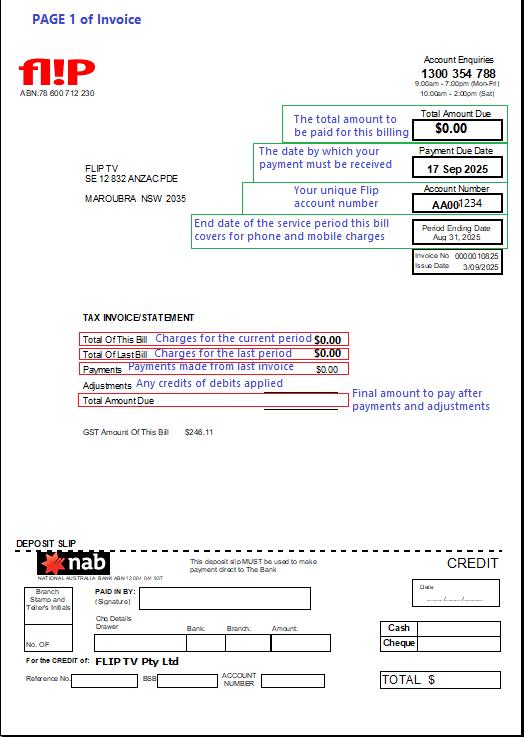 | What's on your bill
You'll also see a summary of recent activity:
|
2. Understanding Your Charges
The "Summary of Charges" section on the second page provides a detailed, line-by-line breakdown of all the services on your account.
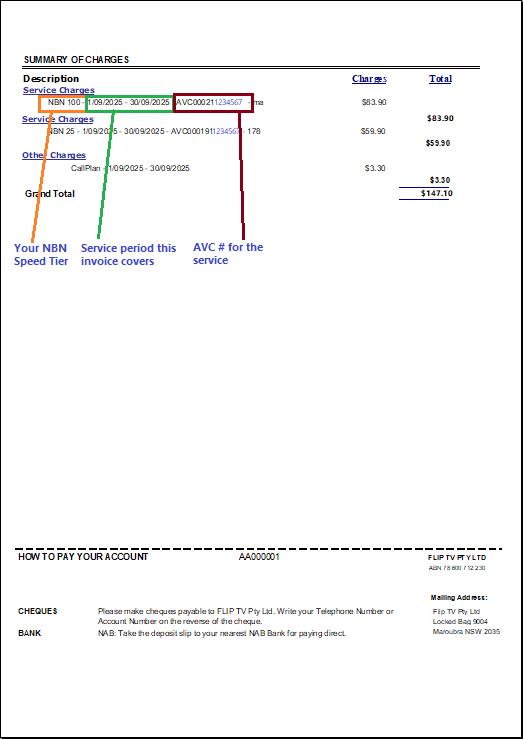 |
|
3. How and When to Pay
Your bill clearly outlines all the ways you can make a payment.
Payment Due Date: Ensure your payment is processed by the due date to avoid late fees or service interruptions.
Payment Methods:
Direct Bank Deposit: Use the attached deposit slip at any National Australia Bank (NAB) branch. Bank details are listed on your bill.
Cheque: Mail a cheque (payable to FLIP TV Pty Ltd) and write your account number on the back.
Mailing Address: Flip TV Pty Ltd, Locked Bag 9004, Maroubra NSW 2035
Need More Help?
We're here for you! If you have any questions about your bill or see a charge you don't understand, our friendly team is happy to help.
Call Account Enquiries: 1300 354 788
Hours: Monday - Friday: 9:00 am - 6:00 pm